 Foto: Kampus Production / Pexels
7 Tips for the Optimal Use of Warning Apps in Germany
Just installing NINA is not enough. These 7 tips ensure you actually receive warnings when they matter and can act on them correctly.
Tip 1: Enable All Notification Permissions
NINA and other warning apps require notification permissions to deliver warnings. Many people install the app but don't enable notifications — making the app useless.
Check:
- iOS: Settings → NINA → Notifications → Allow Notifications → ON
- Android: Settings → Apps → NINA → Notifications → All notifications ON
Also ensure Do Not Disturb doesn't block NINA. On both iOS and Android, you can configure exceptions for critical apps.
Tip 2: Subscribe to Multiple Locations
NINA allows you to subscribe to multiple geographic areas. Add:
- Your home
- Your workplace
- Children's school/daycare
- Elderly relatives' homes
A warning at your child's school location arrives before news reaches you via other channels.
Tip 3: Understand Warning Levels
Germany's warning system uses four levels:
Level 1 (white): Information — no action required, be aware Level 2 (yellow): Warning — attention required, follow guidance Level 3 (orange): Severe warning — prepare to act Level 4 (red): Extreme warning — immediate action required
Not every notification requires evacuation. Most warnings are Level 2 weather alerts that require awareness, not action.
Tip 4: Don't Rely on Your Phone Alone
The critical failure mode: Your phone is dead when the warning comes.
Emergency planning should include a backup:
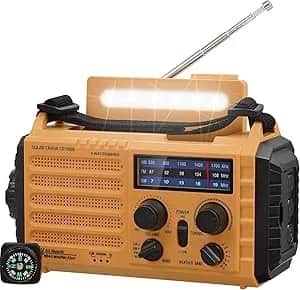
- Battery-powered radio (receives RDS emergency broadcasts and traditional radio)
- Hand-crank radio (generates power without batteries)
Many serious emergencies (especially those affecting infrastructure) coincide with communication disruption. A phone with dead battery + no charging = no warning.
Tip 5: Test Your Configuration on Warntag
Germany's annual Warntag tests every warning channel simultaneously. On this day:
- NINA sends test notifications
- Cell Broadcast sends test messages to all phones
- Sirens activate (where they still exist)
- Radio and TV text services activate
If you receive the test on Warntag: your configuration works. If you don't: debug immediately, not during a real emergency.
Tip 6: Also Subscribe to DWD Weather Warnings Directly
The DWD (Deutscher Wetterdienst) weather service offers its own warning app (WarnWetter) with more detailed meteorological information than NINA's weather integration.
For weather-sensitive scenarios (storm, flood risk, heat wave, snow), the WarnWetter app provides more lead time and detail than NINA's weather warnings alone.
Install both: NINA for civil protection, WarnWetter for weather.
Tip 7: Know What To Do When You Receive a Warning
Receiving a warning is only useful if you know how to respond. The basic response protocol:
- Read the full warning text — not just the notification title
- Identify the warning type and recommended action
- If evacuation: follow official routes, take go-bag, confirm family locations
- If shelter-in-place: close windows, seal doors if chemical event, monitor radio
- If weather warning: take protective measures, avoid travel if severe
The BBK provides response guides for each warning type. These are worth reading in advance — not during an emergency when you're stressed.
The Complete Warning System Setup (5 Minutes)
- Install NINA → enable notifications → add home and other important locations
- Install WarnWetter for weather
- Check if BIWAPP or Katwarn covers your region and install if so
- Verify Do Not Disturb exceptions allow critical notifications
- Add a battery radio to your emergency supplies
- Mark Warntag in your calendar to test annually
Recommended Products
As an Amazon Associate we earn from qualifying purchases. Buying through our links supports the development of this app at no extra cost to you.